iOS 27 bug causes CarPlay issues
AI-assisted summary based on reporting fromEngadget.About our reporting
Key Points
- •Apple released iOS 27, introducing new features to CarPlay alongside navigation problems.
- •Google Maps and Waze guidance banners overlap the map on the screen.
- •An Apple engineer confirmed the navigation display problem is a known issue in iOS 27.
Listen to this story (Audio briefing)
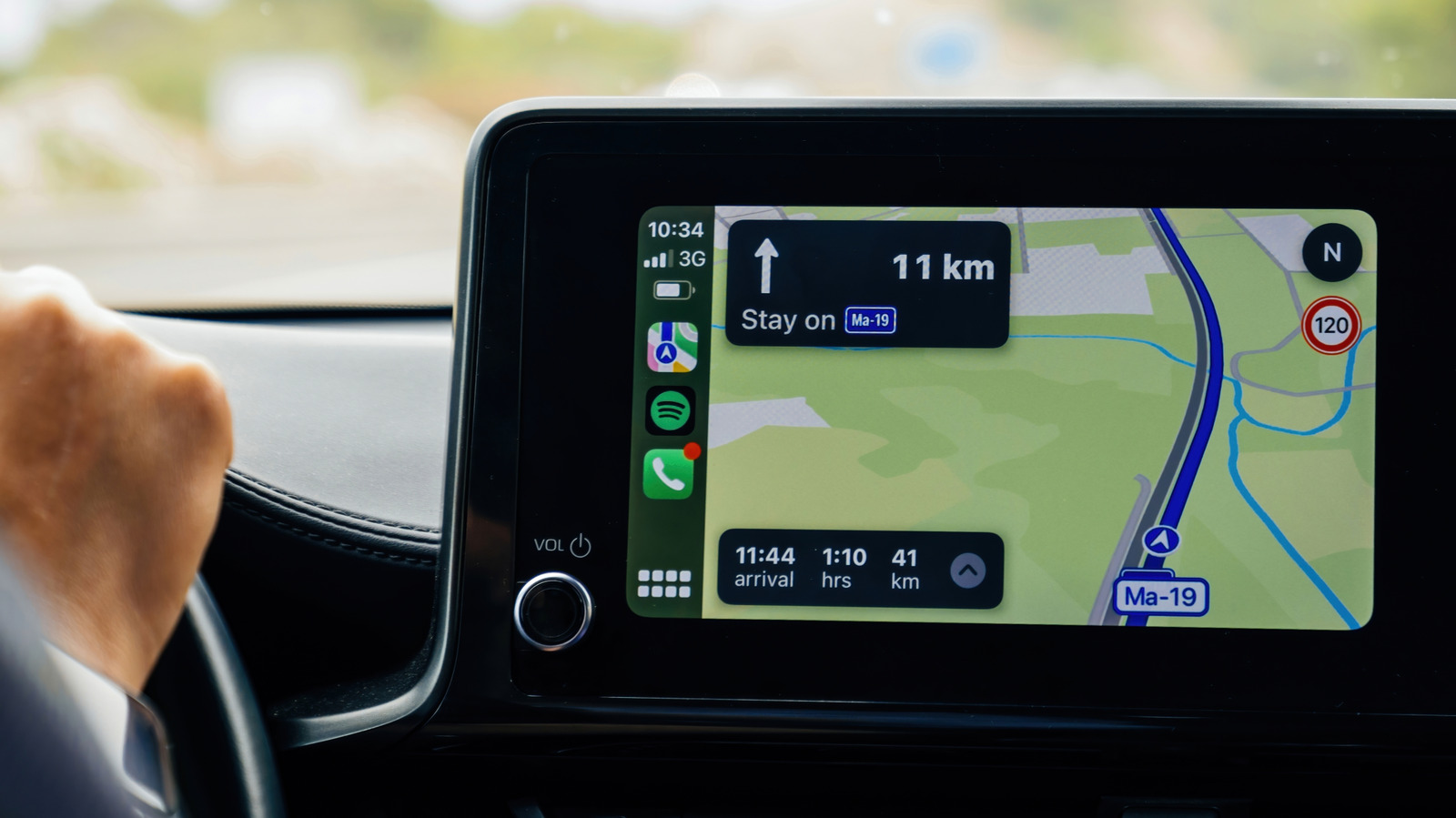
Apple released iOS 27 with new features for CarPlay, including the ability to watch videos while parked. However, the software update introduced navigation problems for third-party navigation apps such as Google Maps and Waze. Many drivers sharing complaints on Reddit noted that guidance banners overlap the map on the display screen. This overlap makes turn-by-turn navigation difficult or nearly impossible to read while driving.
The underlying problem stems from a template redesign that Apple implemented for third-party navigation apps in CarPlay. Unlike standard iOS applications, programs like Waze and Google Maps cannot build their interfaces from scratch inside CarPlay. Instead, these apps send data to iOS, which handles the rendering of next-turn and estimated time of arrival cards. Normally, the map center should shift to the side when the banners pop up, but this function fails following the iOS 27 installation.
A user on Reddit explained that CarPlay stopped reporting the safe area to third-party applications after the phone update. Furthermore, a developer noted the same issue on Apple Developer Forums, where an Apple engineer responded that it is a recognized problem. Apple Maps remains unaffected because native Apple apps utilize their own interface within CarPlay.
The severity of the display issue depends heavily on the physical size of the vehicle screen. Wider screens offer additional space, allowing drivers to view the map despite the overlapping cards. Conversely, compact multimedia units suffer more from the display obstruction.
Because the software bug originates within the operating system rather than the individual navigation programs, updating Google Maps or Waze will not fix the error. Reinstalling the software or re-pairing the car also fails to resolve the overlap. If programs fail to display entirely, users can check settings on an iPhone by going to General, selecting CarPlay, choosing the vehicle from the list, tapping Customize, and confirming that the preferred applications are enabled.
Drivers relying on third-party navigation tools experience obscured maps because of an operating system software bug. As an Apple engineer acknowledged the issue, users must wait for an official software fix rather than attempting standard troubleshooting steps like reinstalls.
Related Stories in AI & Tech
More in AI & Tech →
Smartphone battery life: how to charge your device
Smartphone batteries are lithium-ion and degrade over time based on charging habits and temperature.

Mechanical vs. membrane keyboards: A comparison
Membrane keyboards use a flexible layer of plastic and rubber to register keystrokes.
Smart TV lifespan and how long displays last
On average, a new smart TV can last from seven to 10 years.

Intel Arc GPUs: Are they still worth buying in 2026?
Intel launched its Arc GPU lineup in 2022, initially facing criticism for poor drivers and system instabilities.

Old iPads can replace costly smart gadgets
An old iPad can replace expensive gadgets costing between $150 and $300.

PlayStation 5 Pro PC build cost and comparison
Sony's PlayStation 5 Pro costs up to $900 before add-ons.
Want to Work Remotely for US & Global Tech Companies?
400+ verified remote positions in AI engineering, cloud development, design, and executive leadership are hiring now worldwide. Fast-track direct application with guaranteed employer delivery.
Subscribe to Our Daily AI & Market Briefing
Get our curated daily news brief, clear market takeaways, and essential video dispatches delivered directly to your inbox.